Dynamics 365 is a powerful tool that revolutionizes business operations. From core features to customization options, this guide dives deep into all aspects of Dynamics 365, providing valuable insights for businesses looking to enhance their processes.
Overview of Dynamics 365
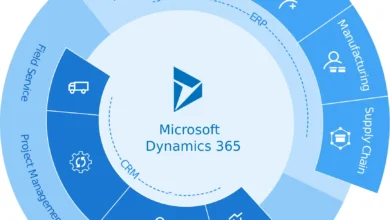
Dynamics 365 is a comprehensive suite of business applications from Microsoft that combines Customer Relationship Management (CRM) and Enterprise Resource Planning (ERP) capabilities. It offers a range of tools to help organizations manage their operations efficiently and improve customer interactions.




Some core features of Dynamics 365 include sales automation, customer service management, marketing automation, financial management, supply chain management, and human resources. These features are designed to streamline processes, boost productivity, and drive business growth.
Industries Benefiting from Dynamics 365
- Manufacturing: Dynamics 365 helps manufacturers optimize production processes, manage inventory, and enhance customer relationships.
- Retail: Retailers can use Dynamics 365 for inventory management, sales forecasting, and personalized marketing campaigns.
- Healthcare: Healthcare providers benefit from Dynamics 365 for patient engagement, appointment scheduling, and billing management.
Modules in Dynamics 365
- Sales: Allows sales teams to track leads, manage opportunities, and forecast sales.
- Customer Service: Enables organizations to provide excellent customer support through various channels.
- Marketing: Helps in creating and executing marketing campaigns, analyzing customer data, and measuring campaign effectiveness.
- Finance and Operations: Manages financial processes, supply chain operations, and human resources.
Implementation of Dynamics 365
Implementing Dynamics 365 in a business requires careful planning and execution to ensure a successful integration. Below are some best practices, common challenges, and a step-by-step guide for setting up Dynamics 365.
Best Practices for Implementing Dynamics 365
- Define clear objectives and goals for the implementation process.
- Engage key stakeholders and ensure their buy-in throughout the process.
- Conduct a thorough assessment of current processes and systems to identify areas for improvement.
- Provide adequate training and support for employees to ensure a smooth transition.
- Regularly communicate progress and updates to all stakeholders to maintain transparency.
Common Challenges Faced During Implementation
- Resistance to change from employees accustomed to existing systems.
- Data migration issues when transferring data from legacy systems to Dynamics 365.
- Integration challenges with other software applications used within the organization.
- Lack of clear communication and alignment between different departments involved in the implementation.
Step-by-Step Guide for Setting up Dynamics 365
- Define project scope, objectives, and key deliverables.
- Conduct a thorough assessment of existing systems and processes.
- Customize Dynamics 365 to meet the specific needs of your business.
- Set up security roles and permissions to control access to data within the system.
- Migrate data from legacy systems to Dynamics 365 using best practices for data migration.
- Train employees on how to use Dynamics 365 effectively and provide ongoing support.
- Regularly review and optimize the system based on user feedback and evolving business needs.
Customization in Dynamics 365
Customization in Dynamics 365 allows businesses to tailor the system to meet their specific needs and requirements. This flexibility enables organizations to optimize their processes and workflows, ultimately enhancing productivity and efficiency.
Customization Options in Dynamics 365
When it comes to customization, Dynamics 365 offers a range of options to modify and extend the system:
- Custom Fields and Entities: Users can create custom fields and entities to capture additional data specific to their business.
- Workflows and Business Process Flows: Organizations can design custom workflows and business process flows to automate tasks and streamline operations.
- Ribbon Workbench: The Ribbon Workbench tool allows users to customize the ribbon interface to suit their unique requirements.
- Form Customization: Users can modify the layout and design of forms to improve user experience and data visibility.
Out-of-the-Box Features vs. Customizations
Out-of-the-box features in Dynamics 365 provide standard functionality that meets the needs of most businesses. However, customizations allow organizations to tailor the system to address specific business processes and requirements that are unique to their industry.
Customizations in Dynamics 365 empower businesses to adapt the system to their exact needs, ensuring a more personalized and efficient user experience.
Examples of Customized Solutions in Dynamics 365
Several industries have leveraged Dynamics 365 customizations to build tailored solutions that enhance their operations:
| Industry | Customized Solution |
|---|---|
| Retail | Custom loyalty program integration to track customer purchases and preferences. |
| Manufacturing | Custom production scheduling module to optimize manufacturing processes. |
| Healthcare | Custom patient management system for comprehensive care coordination. |
Integration with other systems
Integrating Dynamics 365 with third-party applications is crucial for streamlining business processes and maximizing efficiency. By connecting with other systems, organizations can achieve a seamless flow of data and information across different platforms, leading to improved decision-making and enhanced customer experiences.
Methods for integrating Dynamics 365 with third-party applications
- Using connectors: Dynamics 365 offers a range of connectors that allow seamless integration with popular applications such as Microsoft Office 365, SharePoint, and Outlook.
- API integration: Leveraging APIs enables custom integrations with a wide variety of third-party systems, providing flexibility and scalability for unique business requirements.
- Middleware tools: Utilizing middleware tools like Azure Logic Apps or Microsoft Flow can facilitate the integration process by automating workflows and data synchronization between Dynamics 365 and external systems.
Benefits of integrating Dynamics 365 with other systems
- Improved data accuracy: Integration ensures that data is consistent and up-to-date across all systems, reducing errors and enhancing data integrity.
- Enhanced productivity: Seamless integration allows for automated processes, eliminating manual data entry and enabling employees to focus on more strategic tasks.
- Better decision-making: Access to real-time data from integrated systems enables informed decision-making and a deeper understanding of business performance.
Examples of successful integrations and their impact
- Integration of Dynamics 365 with Salesforce: This integration enables sales teams to have a comprehensive view of customer interactions and sales data, leading to improved collaboration and increased sales efficiency.
- Integration with MailChimp: By integrating Dynamics 365 with MailChimp, marketing teams can create targeted email campaigns based on customer data stored in Dynamics, resulting in higher engagement and conversion rates.
- Integration with Power BI: Connecting Dynamics 365 with Power BI allows for the creation of interactive dashboards and reports, providing actionable insights for better business performance monitoring and analysis.
Reporting and Analytics in Dynamics 365
Reporting and analytics play a crucial role in helping businesses make informed decisions and track their performance. In Dynamics 365, users have access to a range of reporting capabilities and analytics tools to gain valuable insights into their operations.
Reporting Capabilities in Dynamics 365
- Dynamics 365 offers pre-built reports that cover various aspects of the business, such as sales, marketing, and customer service.
- Users can create custom reports using tools like Power BI to visualize data from different sources and customize them according to their needs.
- Reports in Dynamics 365 can be scheduled to run automatically and be shared with relevant stakeholders to ensure everyone is informed.
Creating Custom Reports and Dashboards
- With Dynamics 365, users can design personalized dashboards that provide a snapshot of key metrics and KPIs that matter most to their business.
- Custom reports can be tailored to specific requirements, allowing users to analyze data in a way that aligns with their unique business goals.
- Power BI integration in Dynamics 365 enables advanced data visualization and interactive reporting capabilities for more insightful decision-making.
Driving Business Decisions with Analytics
- Analytics in Dynamics 365 empowers organizations to leverage data-driven insights to optimize processes, improve customer experiences, and drive revenue growth.
- By analyzing trends and patterns within the data, businesses can identify opportunities for growth, detect potential risks, and make strategic decisions based on evidence.
- Advanced analytics tools in Dynamics 365, such as machine learning and AI, enable predictive analytics that anticipate future outcomes and recommend actions for better outcomes.
Security and Compliance in Dynamics 365
When it comes to using Dynamics 365, ensuring security and compliance is crucial for safeguarding sensitive data and meeting regulatory requirements. Let’s delve into the security features, compliance tips, and best practices for maintaining data security within Dynamics 365.
Security Features in Dynamics 365
- Dynamics 365 offers role-based security, allowing you to control access to data and functionalities based on user roles.
- Multi-factor authentication adds an extra layer of security by requiring users to verify their identity through multiple methods.
- Encryption of data at rest and in transit ensures that data is protected from unauthorized access.
- Audit trail capabilities track user actions and changes made within Dynamics 365, aiding in identifying any security breaches.
Tips for Ensuring Compliance
- Regularly review and update security roles and permissions to align with the organization’s compliance requirements.
- Implement data retention policies to ensure that data is stored and disposed of in accordance with regulatory guidelines.
- Train users on data protection best practices and compliance requirements to mitigate the risk of inadvertent data breaches.
Best Practices for Data Security in Dynamics 365
- Enable data encryption to protect sensitive information from unauthorized access.
- Regularly monitor user activity and access to detect any suspicious behavior that could indicate a security threat.
- Implement regular security assessments and audits to identify and address vulnerabilities proactively.
- Utilize data loss prevention policies to prevent the unauthorized sharing of sensitive data within Dynamics 365.
Training and Support for Dynamics 365
Training employees on using Dynamics 365 is crucial for the successful implementation and utilization of the platform. Ongoing support is equally important to ensure that users can navigate the system effectively and address any issues that may arise.
Resources for Training
- Utilize official Microsoft training materials and online resources tailored for Dynamics 365.
- Consider hiring external trainers or consultants with expertise in Dynamics 365 to provide specialized training sessions.
- Encourage employees to participate in webinars, workshops, and conferences related to Dynamics 365 to enhance their skills.
Importance of Ongoing Support
- Provide a dedicated support team or help desk for users to reach out to in case of any issues or questions.
- Offer regular training sessions or refresher courses to keep users updated on new features and best practices.
- Implement a feedback system to gather user input and address any recurring issues or challenges.
Tips for Effective Training Programs
- Customize training programs based on the specific roles and responsibilities of employees within the organization.
- Include hands-on exercises and real-life scenarios to help users apply their knowledge in practical situations.
- Encourage peer-to-peer learning and establish a community of practice where users can share tips and best practices.
Updates and New Features in Dynamics 365
Microsoft Dynamics 365 is constantly evolving to meet the ever-changing needs of businesses. Let’s explore some of the recent updates and new features introduced in Dynamics 365, and how they impact user experience and business operations.
AI-powered Insights
One of the key updates in Dynamics 365 is the integration of AI-powered insights, which provide users with valuable data-driven recommendations and predictions. This feature enhances decision-making processes and helps businesses optimize their operations.
Improved User Interface
Another significant update is the enhancement of the user interface in Dynamics 365, making it more intuitive and user-friendly. This update simplifies navigation and improves overall user experience, leading to increased productivity.
Enhanced Integration Capabilities
Dynamics 365 now offers enhanced integration capabilities with other Microsoft products and third-party applications. This facilitates seamless data flow between systems, enabling businesses to streamline processes and improve efficiency.
Mobile App Enhancements
The latest updates in Dynamics 365 include enhancements to the mobile app, allowing users to access important information and perform tasks on the go. This flexibility enables employees to stay productive even when they are away from their desks.
Use Cases and Success Stories
In this section, we will explore real-world examples of how Dynamics 365 has been successfully implemented and the significant benefits it has brought to companies across various industries.
Use Case 1: Improved Customer Relationship Management
- Company X, a global retailer, implemented Dynamics 365 for Sales to streamline their sales process and enhance customer relationship management.
- By leveraging Dynamics 365’s AI capabilities, Company X was able to analyze customer data effectively, leading to personalized marketing campaigns and improved customer engagement.
- As a result, Company X saw a 20% increase in sales and a significant improvement in customer satisfaction and retention rates.
Use Case 2: Enhanced Field Service Management
- Company Y, a manufacturing company, adopted Dynamics 365 for Field Service to optimize their field operations and improve service delivery.
- With Dynamics 365, Company Y could efficiently schedule service appointments, track field technicians’ activities in real-time, and provide timely support to customers.
- As a result, Company Y reduced service response times by 30%, increased first-time fix rates, and achieved higher customer satisfaction scores.
Use Case 3: Streamlined Financial Operations
- Company Z, a financial services provider, integrated Dynamics 365 for Finance and Operations to streamline their financial processes and improve decision-making.
- By centralizing financial data and automating manual tasks, Company Z gained real-time insights into their financial health, enabling faster and more informed business decisions.
- As a result, Company Z reduced operational costs by 15%, improved financial reporting accuracy, and enhanced compliance with regulatory requirements.
Final Thoughts
In conclusion, Dynamics 365 offers a myriad of benefits for businesses seeking to streamline their operations and drive growth. With its extensive capabilities and continuous updates, it remains a top choice for organizations worldwide.

Hi, I’m Lauren. As a digital enthusiast and storyteller, I love breaking down complex ideas into easy-to-read articles. My goal is to provide readers with fresh perspectives and helpful solutions through every piece I write.